Nine Elements | Toolkits | Resources

The Student-Owned Learning-Engagement (SOLE) model began in 2006 as a conceptual and practical model of the learning experience as it is worked through by the learner. The model’s nine elements represent a holistic and comprehensive experience across individual and social boundaries, capturing intellectual, socio-cultural and connectivist processes.

It was initially conceived of as a catalyst for academic professional development conversations. Intended to model the entirety of a learner’s individual journey, it became a tool for designing postgraduate courses. Its original intention remained; however, other work has been built on it. Personal Context spawned work under the POISE project, exploring the need for introspection and support for different epistemologies (notably amid increasing international student numbers). Inform, the learning materials students would engage with in their studies led me to expand my work on educational taxonomies and to develop the DiAL-e Framework, explicitly leveraging the flexibility of digital artefacts.
The model evolved to focus on the needs of learning designers, course designers, and instructional designers, because that was the focus of my professional role. It sought to ensure that comprehensive learning opportunities are balanced and constructively aligned.
A deliberately ‘low-tech’ toolkit to facilitate design processes made transparent the relative weight and duration of learning tasks and activities. As the toolkit has been updated, the focus has shifted to an Excel Workbook to be shared with the student as an advanced organiser, but importantly, it remains a stand-alone design instrument. Only the basic functionality available in Microsoft Excel has been used to ensure that the toolkit is also compatible with other spreadsheet applications. At its core, the SOLE model supports the notion that students learn most effectively when they take ownership of and responsibility for their own learning.
SOLE Model: Origins in Learning Design
The SOLE Model (Student-Owned Learning-Engagement) was conceived in part as a response to Professor John Biggs and his work on Constructive Alignment, to Professor Diana Laurillard’s influential ‘Conversational Framework’, and to Professor Gráinne Conole’s work on toolkits and embedded pedagogy. More recent implementations of the toolkit have been informed by research on learning object sequencing and educational taxonomies. As a result of the language used in the SOLE Model during its implementation in the toolkit, Assessment becomes Assess, for example.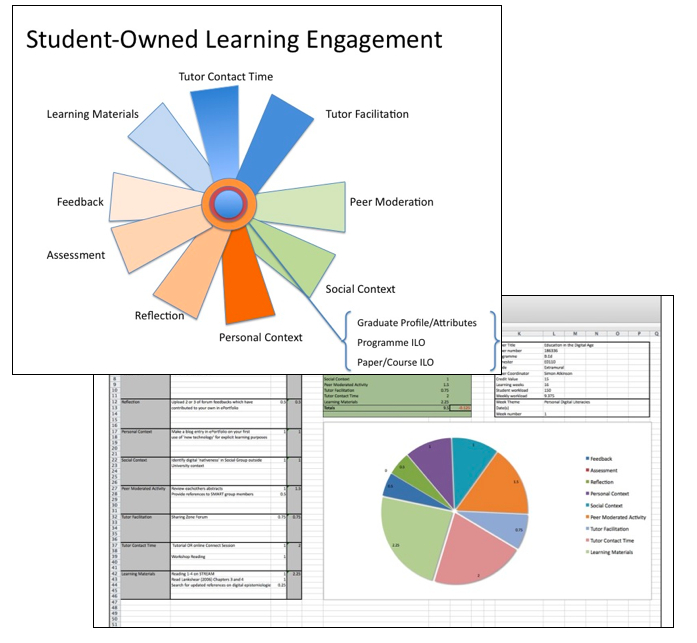
As an educational developer and academic, I have sometimes found it difficult to engage those outside the educational discipline in meaningful discussions about pedagogical practices. The need to develop practical and effective ‘tools’ to assist in pedagogical planning is evident. The LDSE (Learning Design Support Environment) project in the UK was a manifestation of this. However, the experience of developing engagement materials for digital repositories with the DiAL-e Framework has strongly suggested that academics not only require embedded professional development materials but also ‘toolkits’ that require little effort to adopt. The SOLE project extends the work of the DiAL-e in seeking to use only ubiquitous desktop applications to support the pedagogical design process.
The SOLE model was introduced to colleagues in New Zealand at an early stage and tested throughout May-June 2010 with individual learning designers and course development teams at Massey University. The model consists of a visual representation of the modes of engagement designers might seek from their learners. The representation is available as an animated presentation. The associated toolkit, with embedded pedagogical guidance, has been developed in Excel (although any Spreadsheet app will suffice)
Visit the appropriate Toolkit pages to download the Excel version of the toolkit.